Meta Payment Systems Explained: Thresholds, Auto-Bill, and Card Limits
Meta's billing system is opaque on purpose. The threshold rises silently, daily charges show up on dates you didn't expect, and your card limit quietly caps your maximum daily Meta spend even if your campaigns could absorb more. Here's how the system actually works in 2026 — the rules, the retry logic, and the levers you can pull.
HubMeta Payment Systems →By Marcus Rivera · Award Travel Analyst & Points Valuation Editor
Published May 30, 2026 · 10 min read · How we review
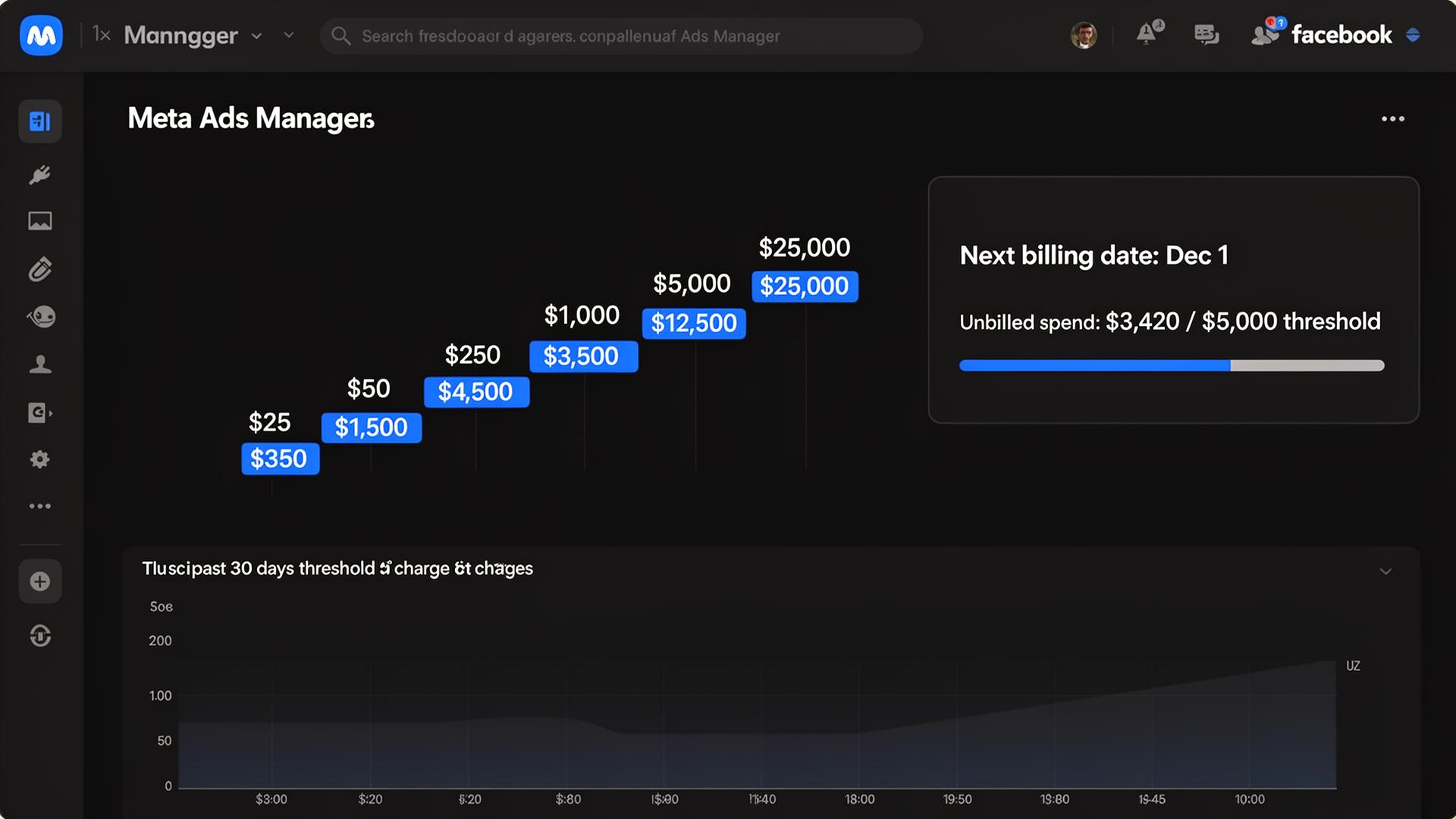
How Meta charges your card: threshold + monthly fallback
Meta charges your card whenever one of two things happens, whichever comes first: (1) your accumulated unbilled spend hits your current billing threshold, or (2) your monthly billing date arrives. On a new account, threshold typically starts at $25. As payments clear on time, Meta raises it: $25 -> $50 -> $250 -> $500 -> $750 -> $1,500 -> $5,000+. High-volume mature accounts can reach $25K+ thresholds. Higher threshold means fewer charges, larger amounts.
Why your card limit is also your daily-spend ceiling
Meta won't let unbilled spend on a single ad account exceed roughly your card's authorization limit. If your card has a $5,000 limit and your threshold is $5,000, you cap out around there in unbilled charges and Meta will start declining new spend until the latest charge clears. This is why traditional preset-limit cards struggle at scale — you can't ramp Meta spend faster than your credit limit. Charge cards (Amex Business Gold, Platinum, Brex, Ramp) with no preset limit dodge this entirely — see our breakdown of Amex charge cards with no preset limit for ads, or skip personal credit altogether with a no-personal-guarantee business card.
What happens when a Meta charge fails
Meta retries failed charges automatically on a cadence: typically within hours, then 24h, then 72h. After roughly three failed retries, the ad account is paused and you'll get a 'your payment is overdue' notice. The campaigns themselves aren't deleted — they resume once payment clears. Backup payment methods kick in only after the primary card has failed all its retries, which is why backups don't fully protect against decline events.
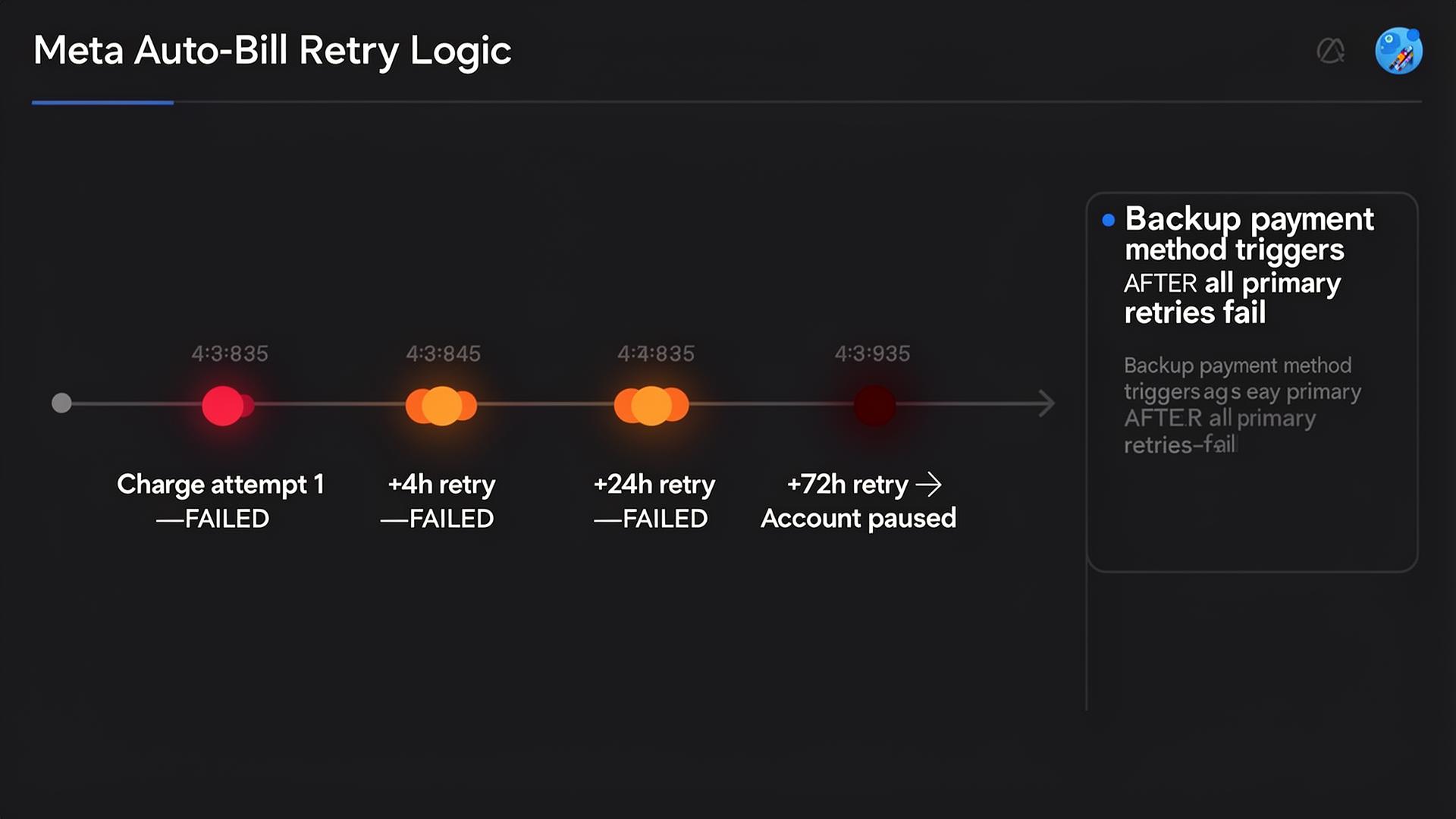
Auto-bill vs manual payments
Auto-bill (the default for credit/debit cards in most countries) means Meta charges you automatically per the threshold/monthly rules above. Manual payments mean you pre-fund the ad account and ads run until the balance hits zero. Manual is required in some countries and useful when you don't want a credit card on file, but it means active monitoring — most agencies prefer auto-bill on a points-earning credit card and never look at billing again until something fails.
How to raise your billing threshold deliberately
Meta raises thresholds based on payment history, not request. The fastest path: never let a charge fail, never miss the monthly billing date, never chargeback a legitimate charge. Most accounts move from $250 to $1,500 within 60 days of consistent on-time payments. There's no way to manually request a higher threshold through self-serve, but high-volume accounts working with a Meta rep can negotiate it as part of an MSA.
Facebook ads billing threshold: the full ladder and how to raise it
The Facebook ads billing threshold (also called the Meta billing threshold) is the unbilled-spend ceiling at which Meta automatically charges your card. The exact ladder in 2026: $25 (new account) -> $50 -> $250 -> $500 -> $750 -> $1,500 -> $2,500 -> $5,000 -> $7,500 -> $12,500 -> $25,000+. Meta raises the threshold automatically based on three signals: (1) at least one full billing cycle without a failed charge, (2) verified payment method age >30 days, (3) consistent monthly spend at or above the current threshold. You cannot request a higher threshold through self-serve — the only way to raise it deliberately is consistent on-time payment history. Accounts that suffer one charge failure typically get knocked back one rung and have to climb again over 30–60 days. High-volume advertisers with a dedicated Meta rep can negotiate manual threshold uplifts as part of an MSA, but this is reserved for spend levels of $250K+/month.
How Meta auto-bill works (and when to use manual payments instead)
Meta auto-bill is the default in the US, UK, EU, Canada, Australia, and most other developed markets: a credit or debit card on file is charged automatically whenever you hit the threshold or the monthly date. You don't see the charge until it posts. Manual payments are a separate billing mode where you pre-fund the ad account with a one-time payment and ads run until the balance hits zero. Manual is mandatory in some countries (India, Brazil, parts of Southeast Asia) and optional in others. Use manual when: (1) you don't want a card permanently on file for security reasons, (2) you're running a one-time campaign with a fixed budget, (3) the local market doesn't support auto-bill. Use auto-bill when: (1) you're scaling ad spend and don't want to manage top-ups, (2) you want every threshold charge earning credit card points, (3) you need uninterrupted campaign delivery.
Facebook ad account billing dates explained
Every Meta ad account has a monthly billing date — typically the 1st of the month for accounts opened mid-month, or the anniversary date of the account creation. On that date, Meta charges any accumulated unbilled spend regardless of whether you've hit your threshold. This is the 'monthly fallback' that catches low-spend accounts: if you're under threshold all month, you still get charged on the 1st (or your anniversary date). For high-spend accounts, the monthly date rarely fires because the threshold trips first multiple times per month. You can view your billing date in Ads Manager -> Billing -> Payment Settings -> Next billing date. Tip: align large agency invoices with the day after your billing date so you've already collected on the previous month's spend before the new month's first threshold charge hits.
Meta payment systems: every accepted payment method in 2026
Meta accepts seven payment method categories in 2026: (1) credit cards from Visa, Mastercard, Amex, Discover, JCB — the most common and the only option that earns points or cashback on ad spend; (2) debit cards from the same networks — works but no rewards, and the daily-spend cap is your debit account balance; (3) PayPal — accepted in most markets, slower retry behavior on failures; (4) direct debit / SEPA in the EU and UK; (5) bank transfer / wire — accepted only in select markets for manual top-ups; (6) Meta Pay balance — usable for boosting personal posts only, not for business ad accounts; (7) prepaid cards — technically accepted but historically prone to declines and account flags, not recommended at any scale. The vast majority of advertisers use credit cards with auto-bill: it's the only combination that simultaneously earns rewards, supports unlimited daily spend (with a charge card), and runs hands-off.
Why this matters for your card choice
Two takeaways: (1) charge cards with no preset limit (Amex Business Gold, Platinum, Brex, Ramp) avoid the limit-as-ceiling problem entirely; (2) the 4x and 3x rewards cards (Amex Business Gold, Chase Ink Preferred) make every threshold charge into a points event. A $5K threshold charge on Gold = 20,000 Membership Rewards points, easily worth $400+ in transferable value. Twelve such charges a year is $4,800 in points you'd otherwise leave on the table — for the full cross-platform ranking see the best business credit card for advertising spend in 2026, and if you're weighing simplicity over redemption upside read cashback vs points on ad spend.
Takeaway
Meta charges you when you hit your threshold OR on your monthly date, whichever comes first. Threshold rises with payment history; your card's credit limit caps your daily-spend ceiling. Charge cards solve the limit problem; rewards cards turn every threshold charge into points. Both matter once you're past $5K/month.
Meta payment methods compared — 2026
Every payment method Meta accepts, ranked by suitability for serious advertisers.
| Payment method | Earns rewards | Daily-spend ceiling | Best for |
|---|---|---|---|
| Credit card (charge card, no preset limit) | Yes — 1.5x to 4x | Effectively unlimited | Scaling agencies, $5K+/month |
| Credit card (revolving, preset limit) | Yes — 1x to 4x | Your credit limit | Most advertisers under $5K/month |
| Debit card | No | Bank account balance | Solo advertisers, budget discipline |
| PayPal | Via linked card | Linked source limit | Backup payment method |
| Direct debit / SEPA (EU/UK) | No | Bank balance | EU accounts that prefer pull-payment |
| Manual top-up (bank transfer) | No | Pre-funded balance | One-time campaigns, no card on file |
| Prepaid card | No | Card balance | Not recommended — flags ad accounts |
Frequently asked questions
What is the Meta payment system?
Meta payment systems is the umbrella term for how Facebook and Instagram bill advertisers for ad spend. It covers three things: (1) the threshold ladder that determines when Meta charges your card, (2) the monthly billing date that catches any unbilled spend at month-end, and (3) the seven accepted payment methods (credit card, debit card, PayPal, direct debit, bank transfer, Meta Pay, prepaid). The default for credit/debit cards is auto-bill — Meta charges automatically whenever threshold or monthly date is hit, whichever comes first.
How do I find my Facebook ads billing threshold?
Open Meta Ads Manager, click the hamburger menu, select Billing, then Payment Settings. Your current billing threshold is displayed under 'Account spending limit / Billing threshold'. You can also see your next monthly billing date and your total unbilled spend so far this cycle. The threshold is account-specific — each Meta ad account has its own threshold and they don't share.
Can I manually raise my Facebook ads billing threshold?
No self-serve option exists in Ads Manager to manually raise the threshold. Meta raises it automatically based on payment history: consistent on-time payments at the current threshold level for 30–60 days typically trigger an automatic uplift to the next tier ($250 -> $500 -> $750 -> $1,500 -> $2,500 -> $5,000 -> $7,500 -> $12,500 -> $25K+). The only manual lever exists for accounts spending $250K+/month working with a dedicated Meta rep, who can negotiate threshold uplifts as part of a master services agreement.
What happens if my Meta auto-bill payment fails?
Meta retries the failed charge automatically: typically within a few hours, then again at 24 hours, then at 72 hours. If all three retries fail, the ad account is paused with a 'payment overdue' notice and your backup payment method (if configured) is charged. Campaigns aren't deleted — they resume the moment a successful payment posts. Two or more failed billing cycles in a row will knock your threshold back one rung and can flag the account for additional verification.
Does Meta accept prepaid cards for ad spend?
Technically yes, but it's strongly discouraged. Prepaid cards (Visa gift cards, Vanilla, etc.) often fail Meta's funding verification, are prone to authorization declines as your unbilled spend grows, and historically have been a signal Meta uses to flag accounts for additional risk review. If you don't want a personal credit card on file, the safer alternatives are: a business virtual card from Ramp / Brex / Mercury (no personal exposure, no decline risk), or manual top-ups via bank transfer in markets that support them.
What's the difference between Meta auto-bill and manual payments?
Auto-bill is the default in most markets: a credit or debit card is charged automatically whenever you hit your billing threshold or your monthly billing date. Manual payments require you to pre-fund the ad account with a one-time payment, and ads run until the balance is depleted. Auto-bill is better for ongoing campaigns and earning credit card points. Manual is required in some markets (India, Brazil) and useful for one-time campaigns with fixed budgets or when you don't want a card permanently on file.
Apply directly to the cards in this guide
Editor-vetted offers. We may earn a referral fee when you're approved — at no cost to you.
American Express
Amex Business Gold
4x Membership Rewards on US online advertising (selectable category) makes every Meta billing-threshold charge a points event. No preset spending limit lets your Meta daily-spend ceiling scale with your ad accounts.
Up to 100,000 Membership Rewards bonus points
Apply for Amex Business Gold →Chase
Chase Ink Business Preferred
3x Ultimate Rewards on social and search advertising up to $150K/year, $95 annual fee. The best fee-to-rewards ratio for any Meta advertiser between $2K and $12K/month.
90,000 Ultimate Rewards bonus points after $8K spend
Apply for Chase Ink Business Preferred →Advertiser disclosure: this page contains affiliate links. We only feature cards we've evaluated for ad-spend use cases.
About the author
Marcus has been writing about credit card rewards since 2014, with bylines at The Points Guy, Doctor of Credit, and AwardWallet. He specializes in transferable points valuation — building the per-point benchmarks that drive every recommendation on this site. He's redeemed over 8.5 million points across Amex Membership Rewards, Chase Ultimate Rewards, Capital One Miles, and Citi ThankYou, including 14 international first-class redemptions on ANA, Singapore, and Air France. On the business side, Marcus has applied for and held 30+ small-business cards over the past decade and tracks issuer rules (Chase 5/24, Amex once-per-lifetime, Capital One velocity) for every recommendation we make.